

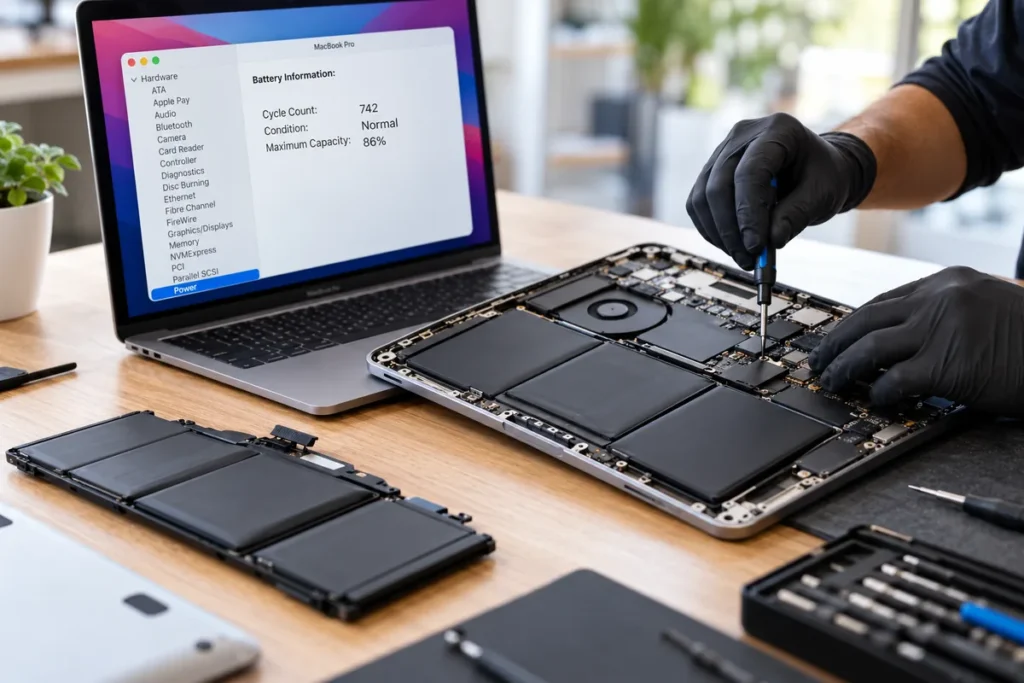
Quick answer: A MacBook battery is rated for around 1,000 charge cycles. Once macOS shows Service Recommended, or the cycle count is near the limit and the machine will not last a working session off the charger, replacement is the fix. A swollen battery is different. If the trackpad is lifting or the case no longer sits flat, stop using the machine and have the battery replaced promptly. Tech Care Qatar replaces MacBook batteries at your home or office anywhere in Qatar.
Key points
- Most modern MacBook batteries are rated for about 1,000 cycles.
- Cycle count on its own is not the whole answer. Battery condition and real world runtime matter more.
- Service Recommended in macOS means the battery has measurably degraded.
- A lifting trackpad or a case that rocks on the desk means a swollen battery. Stop charging it.
- Replacing a battery is far cheaper than replacing a MacBook and often makes an older machine feel new.
How to check your MacBook cycle count
Hold the Option key and click the Apple menu, then choose System Information. In the sidebar, select Power. You will see Cycle Count and Condition.
A charge cycle is one full battery’s worth of use, not one plug in. Using 50 percent today and 50 percent tomorrow counts as one cycle, not two. That is why cycle counts climb slowly for most people.
Most MacBook models made in the last decade are rated for roughly 1,000 cycles. Hitting that number does not mean the battery stops working. It means the battery is expected to hold around 80 percent of its original capacity by that point.
What cycle count is too high?
There is no single number that means replace it today. Read the cycle count alongside two other things.
Condition. If macOS reports Normal, the battery is behaving as expected. If it reports Service Recommended, macOS has measured real degradation and is telling you so.
Real world runtime. This is the figure that actually matters. If the machine used to last most of a working day and now needs a charger by late morning, the battery is worn regardless of what the cycle count says.
As a practical guide: under 300 cycles with Normal condition means there is nothing to do. Between 300 and 800 cycles, watch the runtime. Above 800 cycles, or any cycle count with Service Recommended, replacement is worth doing.
A swollen battery is a different problem
Lithium ion batteries can swell as they age or fail. In a MacBook, the battery sits directly under the trackpad and palm rest, so swelling shows up in ways you can see and feel.
The signs:
- The trackpad sits higher than it used to, feels stiff, or clicks unevenly
- The case rocks when the machine is on a flat desk instead of sitting level
- A visible gap appears where the top and bottom case meet
- The keyboard area feels raised in the middle
A swollen battery is a safety issue, not a performance one. It puts pressure on the trackpad, the logic board and in severe cases the screen. Left long enough it can crack the case or damage components that cost far more than the battery.
If you see any of these signs, stop charging the machine, stop carrying it in a bag where it will be compressed, and arrange a replacement. Do not press on the bulge and do not try to remove the battery yourself.
Should you replace the battery or the MacBook?
For most machines, replacing the battery is the better value, and by a wide margin. The screen, keyboard, storage and processor are unaffected by a worn battery. A fresh battery restores full runtime and removes any performance throttling the machine was doing to protect a failing cell.
| Your situation | Our recommendation |
|---|---|
| Under 300 cycles, Condition Normal | Nothing to do. The battery is healthy. |
| 300 to 800 cycles, runtime still acceptable | Monitor it. No action needed yet. |
| Above 800 cycles, or Service Recommended | Replace the battery. The machine is otherwise fine. |
| Any swelling, lifting trackpad, case not flat | Replace promptly. Stop using it until you do. |
| Battery worn and the machine is an Intel model from 2017 or earlier | Worth a conversation. Software support is narrowing, so weigh the cost against replacing the machine. |
| Battery worn plus a cracked screen and a failed keyboard | Get a quote for all three before deciding. Several faults at once can change the maths. |
What a doorstep battery replacement involves
A technician from Tech Care Qatar comes to your home or office anywhere in Qatar with a certified battery for your exact model. The machine is opened on your table, the old battery is removed, the new one is fitted and seated, and the machine is tested in front of you before the technician leaves.
Most MacBook battery replacements are completed on site. Some models need bench work because of how the battery is bonded into the case, and in that case the machine is collected, worked on at the Doha service centre and returned, usually the same day. You are told which applies to your model when you ask for a quote.
Every replacement uses a certified battery and carries a warranty. After the fit, the cycle count resets and Condition reads Normal again.
If you prefer to visit, the service centre is at Office 52, 5th Floor, Al Ezz Tower 4, Old Slata, Doha, open Saturday to Thursday 9 AM to 9 PM and Friday 4 PM to 10 PM.
Send your model and cycle count to +974 777 42 712 on WhatsApp for a quote.
Frequently asked questions
How many cycles should a MacBook battery last?
Most modern MacBook batteries are rated for around 1,000 charge cycles, at which point they are expected to hold roughly 80 percent of their original capacity.
What does Service Recommended mean on a MacBook battery?
It means macOS has measured real degradation in the battery and is advising replacement. The machine will usually still run, but runtime will be noticeably shorter.
Is a swollen MacBook battery dangerous?
It is a safety issue and should be dealt with promptly. Stop charging the machine, avoid carrying it compressed in a bag, and arrange a replacement. Do not press on the swelling or attempt to remove the battery yourself.
Can you replace a MacBook battery at my home in Qatar?
Yes. Most models are replaced at your home or office anywhere in Qatar. A few models need bench work and are collected and returned, usually the same day.
Is replacing a MacBook battery worth it?
In most cases yes. It is one of the least expensive MacBook repairs, it restores full runtime, and everything else in the machine is unaffected by a worn battery.
Does the cycle count reset after a battery replacement?
Yes. A new battery reports its own cycle count starting from zero, and Condition returns to Normal.


